
Organization Management
Every user in Hashiro belongs to an organization, the fundamental unit of tenancy, billing, and access control. All data (assets, findings, projects, configurations) is scoped to an organization and isolated from other tenants.
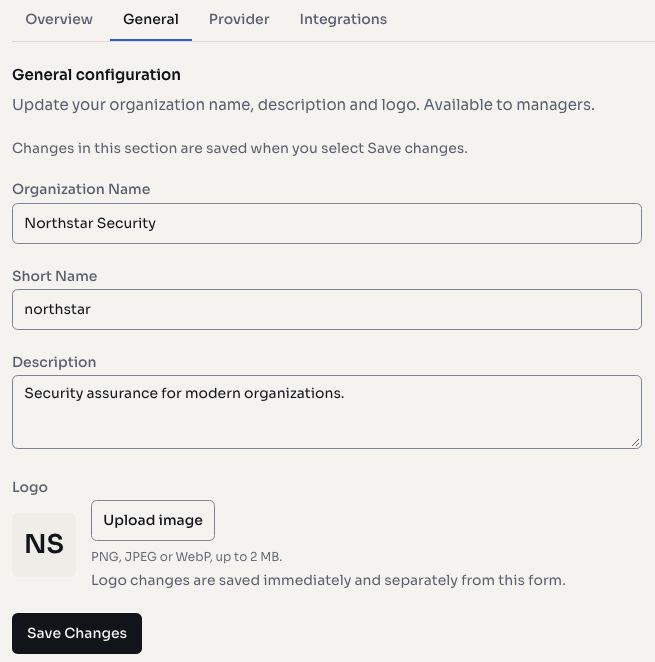
Screenshots use fictional demonstration data.
Organization Types
Hashiro supports three organizational models:
Provider Organizations
Security firms, MSSPs, and consultancies that deliver services to multiple clients. Providers can:
- Provision and manage client organizations
- Access client data through established relationships
- View aggregated metrics across all clients via the Estate Dashboard
- Manage shared templates and configurations
- Define custom project types
Client Organizations
Organizations managed by a provider. Clients have their own isolated workspace but are linked to their provider for service delivery. Clients can:
- View and interact with their own projects, assets, and findings
- Manage their own team members (within provider-set limits)
- Request account deletion through a formal process
Direct Organizations
Standalone organizations using Hashiro independently, without a provider relationship. They have full access to all platform features within their license tier.
Organization Settings
Access organization settings from the sidebar under Organization.
General
- Name: your organization's display name
- Short name: abbreviated identifier used in URLs and references
- Description: optional organization description
- Logo: upload a custom logo (displayed in the sidebar and reports)
- Default language: set the default language for the organization (English or Portuguese)
Security
- OTP policy: when enabled, all organization members are required to configure multi-factor authentication
- Email domain restriction: limit user invitations to specific email domains
License Tiers
Your organization's license determines which features are available and at what scale.
| Tier | Description |
|---|---|
| Free Business | Basic features with limited asset counts |
| Small Business | Project management for smaller teams |
| Medium Business | Increased capacity and contracted features |
| Custom Business | Enterprise features with custom limits |
| Provider | Multi-client management with estate dashboards |
| Hunter | Bug bounty and independent researcher features |
License limits include:
- Maximum number of users
- Maximum EASM assets
- Maximum internal projects
- Access to specific modules (EASM, Cloud, AI Assessments)
TIP
Contact your administrator or Hashiro sales to upgrade your license tier or adjust limits.
Creating an Organization
- Providers can create client organizations from the Customers page
- Staff can create any organization type from the admin panel
- Account activation follows an invitation or the platform's provisioning process
Related
- Team & Users: manage members
- Roles & Permissions: configure access control
- Customers: provider client management
- Settings: organization configuration