
Agent Types
Agent types are reusable assessment pipeline definitions. Each agent type configures the full behavior of an AI assessment: stages, tools, models, and capabilities.
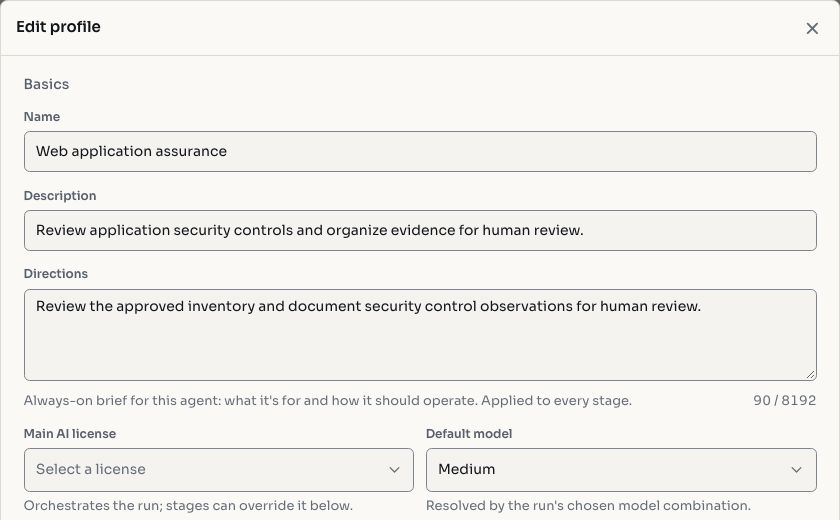
Screenshots use fictional demonstration data.
Creating an Agent Type
The Agent Type Builder lets you define every aspect of an assessment pipeline.
Stages
Each agent type consists of one or more sequential stages:
| Field | Description |
|---|---|
| Goal | What the agent should accomplish in this stage |
| System prompt | Instructions that shape the agent's behavior |
| Tools | Available tools (exec, http_request, galileo, knowledge_base, etc.) |
| Operation classes | Categories of allowed operations |
| Effect limits | Boundaries on destructive or high-impact actions |
| Token budget | Maximum tokens the agent can consume |
| Loops | How many execution loops the agent can perform |
A typical pipeline defines four stages: Discovery, Vulnerability Analysis, Exploitation, and Reporting.
Bundles
Bundles are capability packages that group related tools and permissions. They let you compose agent capabilities without configuring each tool individually.
License Assignment
Each agent type is associated with an AI license that determines which LLM provider and API key to use.
Model Selection
Configure which LLM model the agent uses for:
- Execution: the primary model that makes tool calls and processes results
- Strategist: an optional reasoning model that advises on next steps
Model combinations allow tier-based selection (lightweight, medium, smarter) so different tasks use appropriately sized models.
Advanced Features
Breadth Sweep
Enable breadth sweep to run a background generalist scanning sub-agent alongside the main assessment. This agent performs broad surface-level testing across the entire scope while the primary agent goes deep on specific areas.
Coordination
Enables multi-agent assignment scheduling. Multiple agents are orchestrated to cover different parts of the scope without duplicating work.
Exploitation
Toggle autonomous exploitation mode to allow the agent to attempt exploitation without human confirmation.
C2 Integration
For adversary emulation assessments, agent types can include C2 (command-and-control) capabilities for red team operations.
Default vs Custom Agent Types
Hashiro provides default agent types available to all organizations, maintained by the platform team. Organizations can also create custom agent types tailored to their testing methodologies or compliance requirements.
TIP
Providers can use the Hide default agents toggle to show only their custom types.
Import & Export
Agent types can be exported as JSON and imported into other organizations, making it easy to share configurations across teams.