
Issues
The Issues tab displays all vulnerabilities and misconfigurations detected on your attack surface during EASM scans. These findings are generated automatically through Nuclei template scanning and other detection mechanisms.
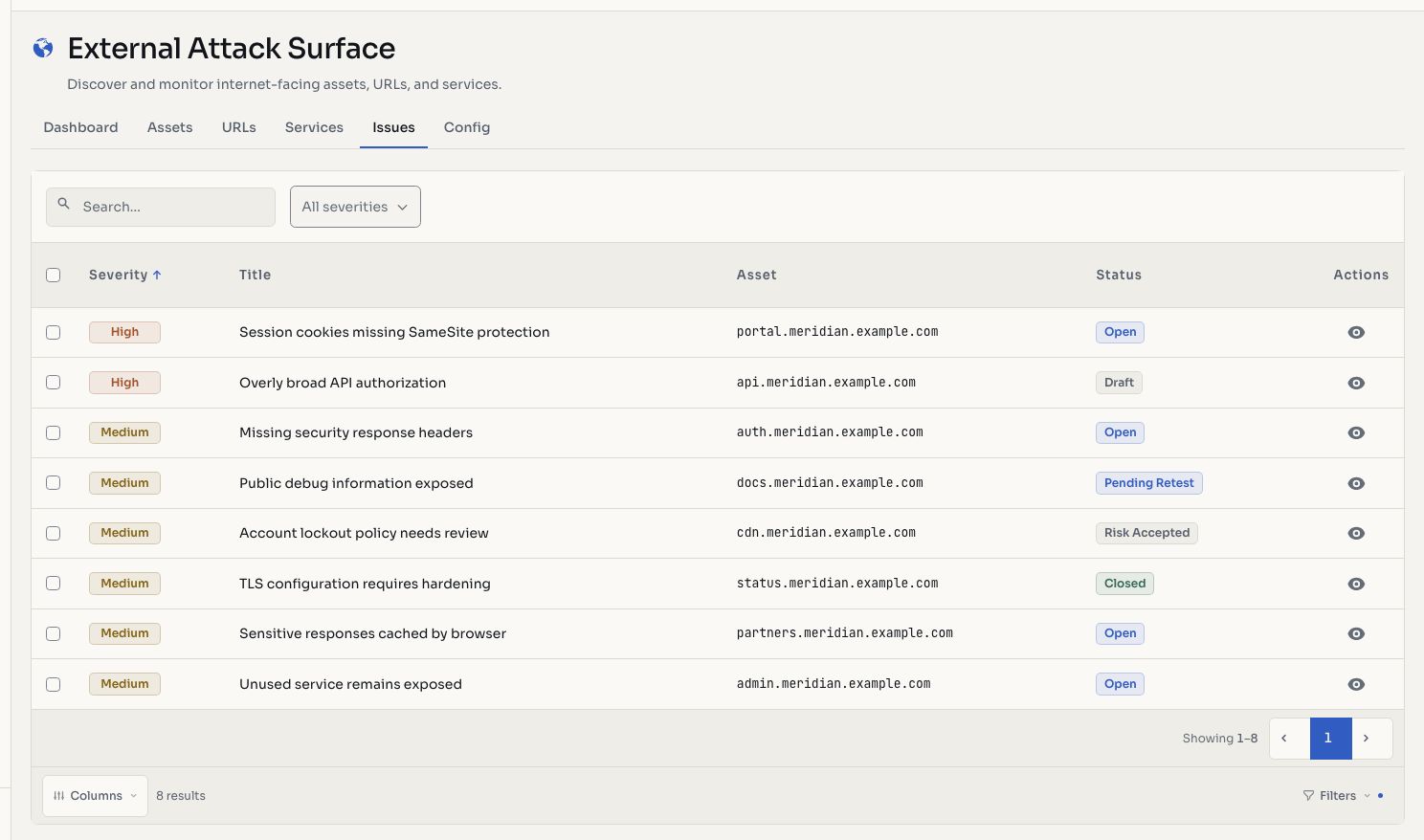
Screenshots use fictional demonstration data.
Issue List
Issues are presented in a table with severity badges for quick triage:
| Column | Description |
|---|---|
| Title | Name of the vulnerability or misconfiguration |
| Asset | The affected hostname or IP |
| Severity | Critical, High, Medium, Low, or Informative |
| Status | Current issue status (open, closed, etc.) |
| Detected | When the issue was first discovered |
Severity Levels
- Critical: exploitable vulnerabilities with severe impact (e.g., RCE, authentication bypass)
- High: significant vulnerabilities that could lead to data exposure or system compromise
- Medium: moderate-risk findings for normal remediation cycles
- Low: minor issues with limited direct impact
- Informative: observations that don't represent a direct risk but may be useful for hardening
Automated Detection
EASM issues are discovered through:
- Nuclei Templates: community and custom templates that detect known CVEs, misconfigurations, default credentials, exposed panels, and more
- Configuration Checks: missing security headers, insecure TLS configurations, open redirects
- Exposure Detection: sensitive files, backup files, directory listings, debug endpoints
Bulk Operations
Select multiple issues and perform bulk actions:
- Change Status: move selected issues to open, closed, accepted, or not applicable
Issue Detail
Clicking an issue opens its full detail view within the Vulnerability Management system, where you can:
- Review the full finding description and evidence
- Assign a CVSS score
- Track remediation through the issue lifecycle
- Add retest notes
- View history and audit trail
TIP
EASM issues feed into the same vulnerability management workflow as manually reported findings. They share the same lifecycle, statuses, and reporting capabilities. The only difference is they were detected automatically.
Related Features
- Vulnerability Management: full issue lifecycle and remediation tracking
- Nuclei Templates: customize which checks run against your attack surface
- EASM Configuration: review included scope and exclusions
Change issue status
Your organization can track remediation of its surface findings using the status controls available to its account.
- Open Attack Surface > Issues.
- Filter or search for the findings you want to review.
- Open a finding to inspect its description, affected asset, evidence, and history.
- To change several findings, select their rows and choose Change status.
- Select the status and confirm. Check that the table shows the updated state.
Typical choices include Open, Closed, Invalid, Out of scope, Risk accepted, Review, and Pending retest. Draft is available to eligible provider accounts. Use Pending retest when a fix needs verification and Closed after correction is confirmed. Risk accepted records a conscious decision to retain a risk.
A status change records the workflow decision; it does not fix the underlying system. If you cannot edit, check your organization and role with its manager. AI candidate decisions can require the separate review workflow.