
AI Schedules
AI schedules run automated assessments on a recurring basis using cron expressions. Set up a schedule once, and Hashiro launches assessments at the defined intervals.
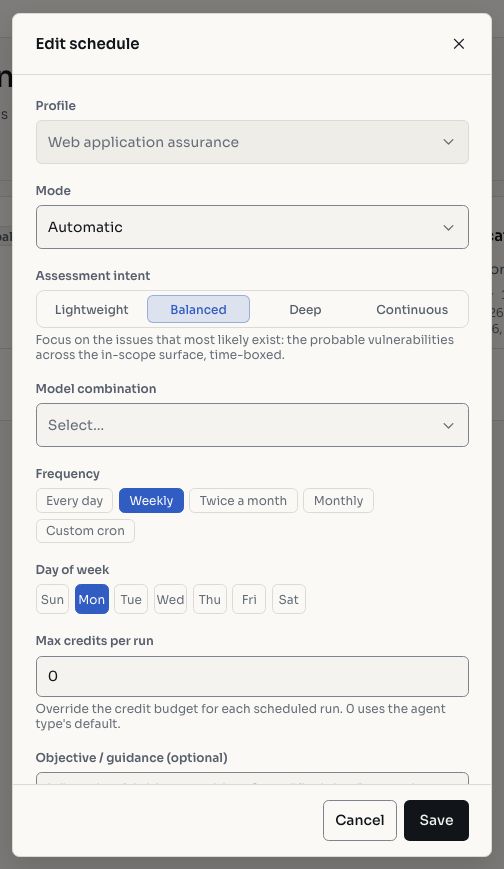
Screenshots use fictional demonstration data.
Creating a Schedule
The schedule builder lets you configure:
| Field | Description |
|---|---|
| Agent type | Which assessment pipeline to use |
| Run mode | Automatic, Assisted, or Checklist |
| Assessment depth | How thorough the assessment should be |
| Cron expression | When to run (e.g., 0 2 * * 1 for every Monday at 2 AM) |
| Project | Which project to assess |
Managing Schedules
Each schedule can be:
- Enabled: actively running on its cron schedule
- Disabled: paused, no new runs are created
- Edited: update any configuration field
- Deleted: permanently removed
Execution History
Every schedule has an execution history tab showing:
- Past runs with status (completed, failed, canceled)
- Start and end times
- Number of findings discovered
- Link to the full run details
Use Cases
- Continuous validation: schedule weekly or monthly assessments to catch new vulnerabilities from deployments or configuration changes.
- Regression testing: periodic re-tests to confirm fixes hold.
- Compliance: evidence of regular security testing for frameworks requiring periodic assessments.
TIP
Combine schedules with Checklists for fully automated compliance testing: the assessment runs on schedule, follows a standardized checklist, and produces auditable results.