
Local Runs
Local access is relevant when an assessment needs to review an environment that is reachable only from an authorized machine or private network. In the documented project workflow, a connector provides access to that environment while the assessment remains associated with its Hashiro project.
Local access is an execution-location and connectivity choice. It is not a fourth interaction mode: the run can still use the available Automatic, Assisted, or Checklist mode.
Local access and local execution are different
| Concept | Meaning |
|---|---|
| Private-network access | The assessment reaches an approved private environment through a connected project connector. |
| Fully local execution | The assessment engine itself runs on the operator's machine or within the local environment. This requires a separately supported execution option. |
| Plugin execution | A plugin provides a particular assessment capability, such as purple team validation, when enabled for the organization. |
Selecting a connector does not establish that the assessment engine runs entirely on your machine. It also does not establish that processing is offline or that results never leave the environment. Check the applicable organization configuration and data-handling requirements with your provider.
When local access is useful
Examples include private applications, an internal API, a staging environment reachable only from an approved network, or an environment with specific access requirements. Reachability is only one prerequisite: the project must also contain the intended included scope and exclusions.
A machine being reachable through a connector does not automatically make every resource reachable from that machine part of the assessment.
Responsibilities before the run
The provider and environment owner should agree on the intended environment, approved access, review objective, time window, and how evidence will be handled. Keep the project context current so the reviewer can interpret the resulting observations.
The operator should confirm that the project offers the required connector, that it belongs to the intended environment, and that its status is connected. Use the organization's provided connector setup instructions and review access with the environment owner. Installation and access configuration depend on the environment and should not be inferred from a generic screenshot.
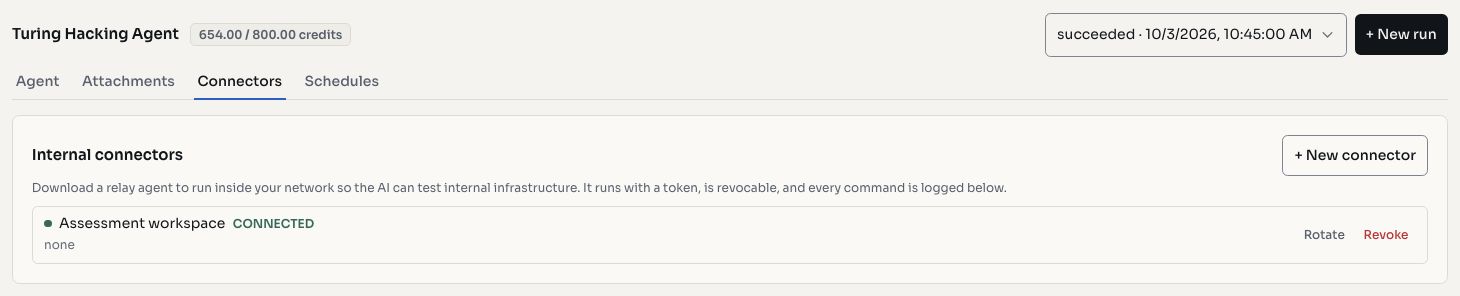
Screenshots use fictional demonstration data.
Readiness in the project
Open the project's AI Pentest area and review its connector panel. A connected status indicates that the relay is available; it is not proof that every intended application is reachable or that every assessment prerequisite is satisfied.
Review readiness in three parts:
| Part | What to confirm |
|---|---|
| Project | Correct engagement, included scope, exclusions, and permissions |
| Environment | Appropriate access to the intended private resources and required context |
| Run | Appropriate profile, interaction mode, intent, credit budget, and selected connector |
If more than one connector is offered, identify the environment each represents before choosing. Do not select one solely because it is currently connected.
Monitor access separately from results
Follow the connector's connection status and last-seen information alongside the run's progress. Available activity records can help the operator distinguish an access problem from an assessment observation.
If connectivity is lost, part of the review may remain blocked or incomplete. Restore the approved access through the environment's normal support process and review the affected coverage before deciding whether a follow-up run is needed. Do not mark unreviewed areas as passing because the run stopped without finding an issue.
A connected connector does not guarantee a successful run. Missing project context, unavailable dependencies, insufficient credits, and execution errors can still affect the outcome.
Review and close out
Review candidates and evidence through the project, using the same issue workflow as other AI runs. Keep the connector's activity history separate from the acceptance of a finding: activity demonstrates that work occurred, while a finding needs evidence of the issue.
At the end of the engagement, have the environment owner review whether local access is still needed. Connector revocation and rotation belong to the authorized access-management process. Preserve the assessment evidence according to the organization's retention requirements.
For operating modes, see AI Runs. For a coordinated defensive exercise using a plugin, see Purple Team Runs.