
Issue Lifecycle
Every vulnerability finding in Hashiro follows a structured lifecycle from discovery through resolution. Understanding these stages helps teams track remediation progress and maintain clear communication.
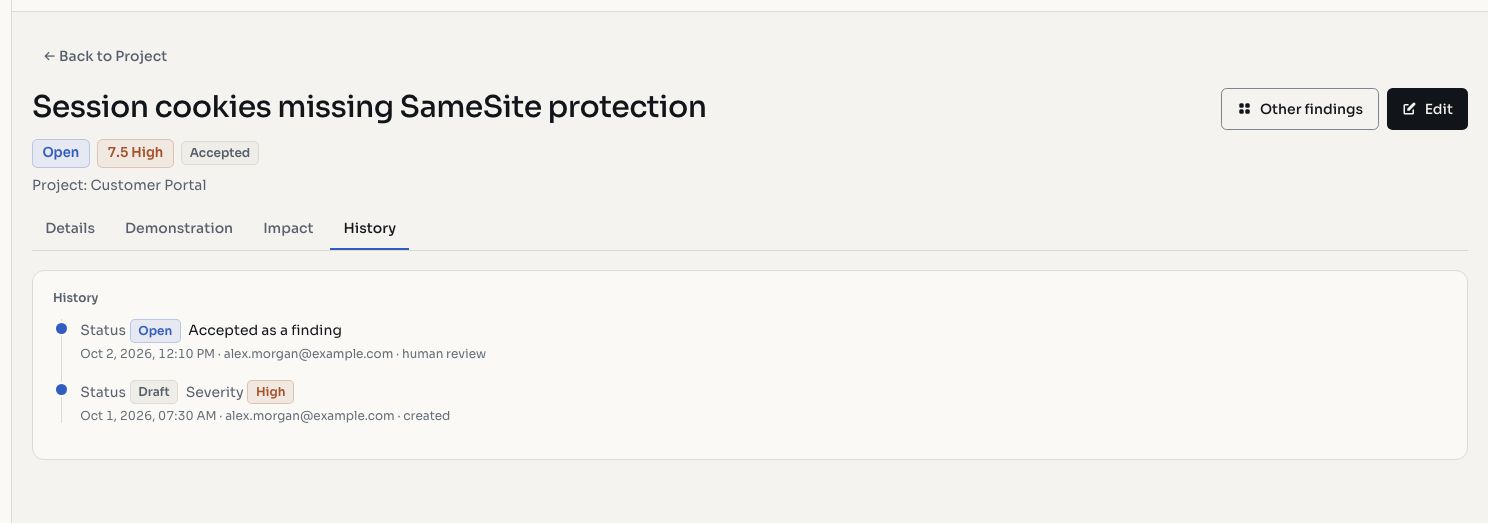
Screenshots use fictional demonstration data.
Statuses
| Status | Description |
|---|---|
| Draft | Finding is being documented, not yet visible to clients |
| Open | Confirmed vulnerability, visible and awaiting remediation |
| Closed | Successfully remediated and verified |
| Accepted | Risk accepted by the client, no remediation planned |
| Pending Retest | Client reports a fix, awaiting verification by the tester |
| Retesting | Tester is actively verifying the reported fix |
| Retest Failed | Fix was insufficient, vulnerability still present |
| Not Applicable | Finding does not apply to the target environment |
| Duplicate | Finding duplicates another existing issue |
| Informative | Observation with no direct security impact |
Typical Flow
Draft → Open → Pending Retest → Retesting → Closed
                                           → Retest Failed → Open (cycle repeats)
Alternative paths:
Open → Accepted (risk accepted)
Open → Not Applicable
Open → Duplicate
Draft → Informative
Verification Workflow
For AI-generated findings, an additional verification layer applies:
| Verification State | Meaning |
|---|---|
| Candidate | AI-generated finding awaiting human review |
| Accepted | Reviewer confirmed the finding is valid |
| Rejected | Reviewer determined the finding is invalid |
| Needs Evidence | Additional evidence requested before acceptance |
| Merged | Finding combined with another existing issue |
TIP
Candidate findings from AI assessments can be made publicly visible to clients before full verification, so clients can see what automated testing discovered while the provider reviews for accuracy.
Retest Tracking
When a client submits a fix for verification:
- The issue moves to Pending Retest
- The pentester picks it up and moves to Retesting
- After verification, it becomes either Closed (fix effective) or Retest Failed (vulnerability persists)
Retest comments capture what was tested and the outcome, providing a clear record of remediation attempts.
Bulk Operations
For managing large finding sets efficiently:
- Bulk status change: select multiple issues and transition them simultaneously
- Bulk delete: remove multiple findings at once
WARNING
Bulk operations affect all selected findings immediately. Review your selection carefully before applying.
Audit Trail
Every status change, severity modification, and retest event is recorded in the issue's history timeline. This immutable log includes what changed, who made the change, and when it occurred.