
Cloud Security
Hashiro's Cloud Security module provides Cloud Security Posture Management (CSPM): continuous monitoring of your cloud infrastructure for misconfigurations, compliance gaps, and security risks.
Connect your AWS, Azure, or GCP accounts and Hashiro will scan your cloud resources, detect misconfigurations, and track your compliance posture over time.
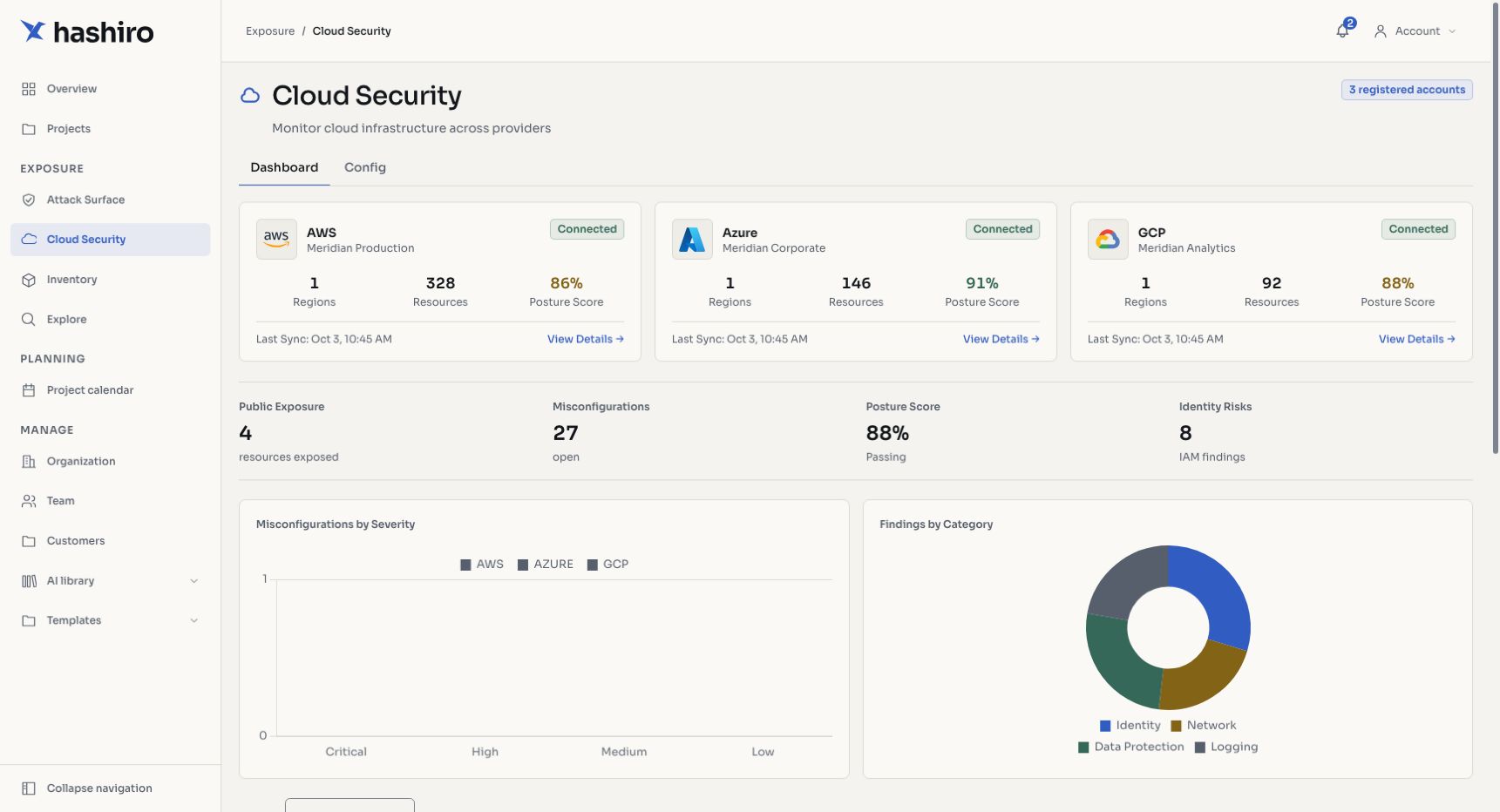
Screenshots use fictional demonstration data.
Multi-Cloud Support
| Provider | Connection Method |
|---|---|
| AWS | Access key credentials in the current connection form |
| Azure | Service principal credentials |
| GCP | Service account key |
You can connect multiple accounts across different providers to get a unified view of your entire cloud estate.
Cloud Dashboard
The cloud dashboard provides an at-a-glance view of your posture:
- Posture Score: aggregate security score across all connected accounts
- Resource Counts: total cloud resources discovered and monitored
- Misconfigurations: open misconfigurations broken down by severity
- Public Exposure: resources with public-facing access
Charts and Visualizations
- Misconfigurations by Severity: bar chart showing the distribution across critical, high, medium, and low
- Findings by Category: doughnut chart breaking down findings into:
- Identity & Access Management: IAM policies, role permissions, MFA enforcement
- Network: security groups, NACLs, public endpoints, VPC configuration
- Data Protection: encryption at rest, encryption in transit, bucket policies
- Logging & Monitoring: CloudTrail, flow logs, audit logging, alerting
Key Capabilities
- Automated Scanning: periodic scans of all connected cloud accounts
- Misconfiguration Detection: identify security gaps against best practices and benchmarks
- Compliance Tracking: map findings to CIS benchmarks and track progress
- Scan Reconciliation: automatically resolve findings that are no longer detected
- Multi-Account: unified view across multiple accounts and providers
- Credential Security: all cloud credentials are encrypted at rest
Getting Started
Use Connect a cloud account to configure AWS, Azure, or GCP access in the current connection form.
TIP
Cloud Security is available on business plans and above. The number of supported provider accounts depends on your license tier.
Related Features
- Attack Surface (EASM): monitor external-facing assets alongside your cloud posture
- Dashboard: see cloud security metrics on the main dashboard
Navigate cloud results
- Open Cloud Security.
- Review the connected-account cards and latest assessment information.
- Open an account to focus on its resources and findings.
- Use the misconfiguration section to filter by severity and status.
- Open a row to inspect the affected resource, evidence, and remediation.
Connected, Disconnected, and Error describe the account connection. Never assessed or no score means assessment results are not yet available; it is not a clean security result. Use Connect a cloud account for setup and Misconfigurations for status changes.